
Optimizing images is one of the most impactful steps to improve page loading speeds and SEO metrics in WordPress. However, traditional optimization plugins often rely on complex server-side binaries or restrictive third-party cloud APIs. Today, we review Image Optimizer, an innovative, custom-built proprietary WordPress plugin that fundamentally changes this approach. By shifting the entire computation workload entirely onto the client side, it processes images right inside the user’s browser using advanced client-side libraries and WebAssembly binaries. Accessible via a persistent, fixed modal interface from any page within the WordPress admin dashboard, it brings top-tier desktop performance directly into the CMS ecosystem.
The Architectural Edge: Zero Server Load, Absolute Privacy
The standout architectural feat of Image Optimizer is its client-side engine. Traditional setups process batches using standard PHP libraries like GD or Imagick, which frequently causes script timeouts on cheaper hosting packages, or they require external API keys that transmit proprietary media off-site. Image Optimizer bypasses these pitfalls entirely by downloading raw data straight into the browser and executing local compression matrices using WebAssembly (libwebp). Your server resources remain completely untouched, zero external API limitations apply, and your data never leaves your infrastructure.
Key Takeaway: Because all compression and format conversions happen locally via the client’s browser, large image batch jobs won’t trigger 504 Gateway Timeouts or consume your server’s valuable CPU cycles.
Comprehensive Feature Breakdown by Module
Image Optimizer is structurally organized into four dedicated operational tabs, each managing a specific phase of the media asset lifecycle:
1. Upload New: Pre-Processing Pipeline
The dashboard opens natively on the Upload New module. This tab serves as an interactive drag-and-drop or clipboard-paste landing area for external files before they ever reach the server environment.
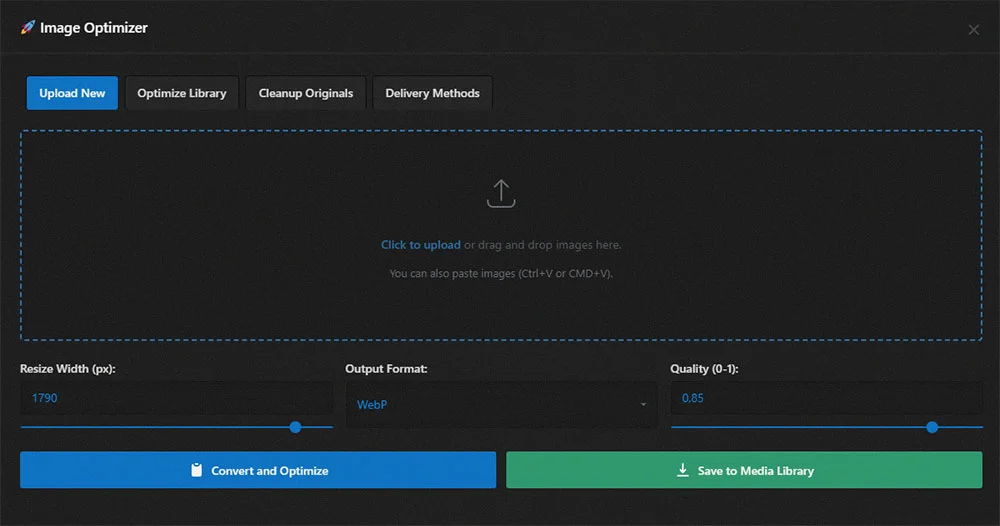
- Flexible Multi-Mode Ingestion: Fully supports individual file targets or rapid batch uploads. It also handles raw clipboard pasting (
Ctrl+VorCmd+V) for immediate processing. - On-the-Fly Formatting Options: Cross-converts incoming formats seamlessly among
JPG,PNG,AVIF, andWebPbased on explicit developer configurations. - Granular Dimensional Downscaling: Features a responsive slider to cap the maximum width of images in pixels prior to format rendering, eliminating oversized photography at the root.
- Lossy Quality Modifiers: Offers a custom slider targeting precise target quality thresholds (scaled from 0 to 1.0) to fine-tune visual fidelity against structural disk size.
- Safety Net Deletion: Includes individual queue clearing buttons, allowing users to safely discard staged elements from the upload table before finalizing mutations.
- Destinations: Offers an immediate toggle to either compile processed elements directly into a downloadable archival archive file or systematically commit them into the core WordPress Media Library.
2. Optimize Library: Retroactive Mass-Processing
The Optimize Library interface allows developers to sweep existing directory folders and bring old legacy media up to modern compression standards.
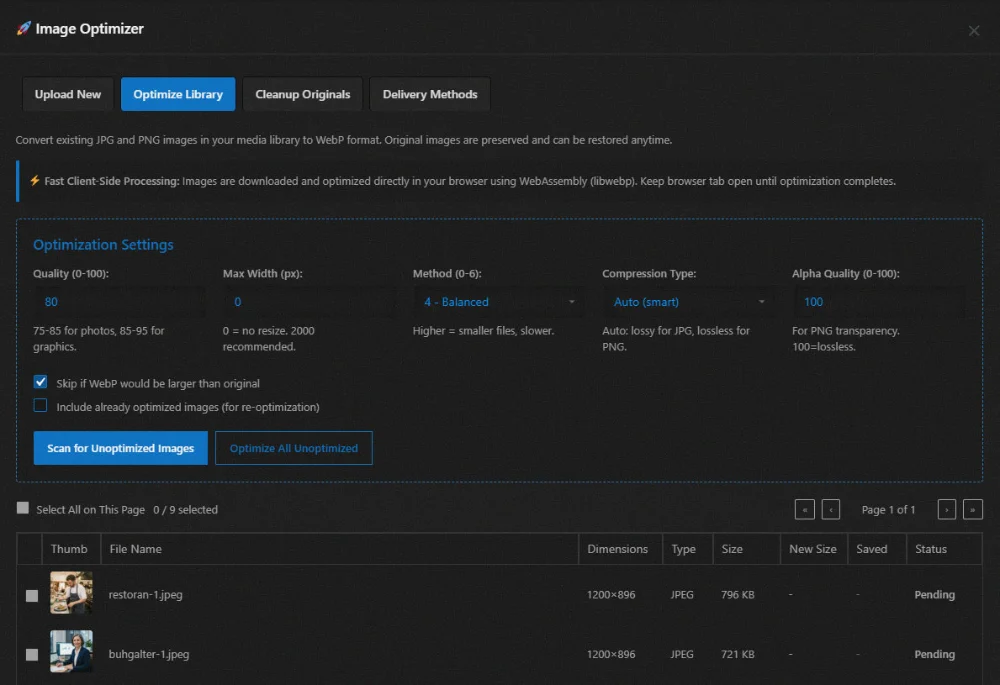
- Comprehensive Asset Scanning: Audits existing media uploads, compiling detailed telemetry regarding files, sizes, explicit extensions, and status states.
- Granular Compression Configurations: Offers a range of specialized tuning profiles:
- Speed Engine Modes: Select from Fastest, Fast, Balanced, or Best Compression depending on how much processing time you wish to allocate.
- Compression Strategies: Toggle between Smart Lossy, Lossless, and Near-lossless variations to control compression depth.
- Alpha Channel Control: Dedicated slider to manage alpha channel transparency quality (0-100) specifically for complex translucent PNG assets.
- Data-Dense Telemetry Table: An interactive, paginated overview that displays thumbnails, dimensions, source types, and current file sizes. Post-processing fields update dynamically to display the new optimized size, updated format type, and total disk storage saved.
- Selective Batch Optimization: Features individual checkboxes alongside a master “Select All” control, allowing you to optimize targeted selections or process the entire view at once.
3. Cleanup Originals: Storage Reclamation
To ensure non-destructive testing, the plugin retains original image copies during compression. The Cleanup Originals module provides the tools to manage these source files once you are satisfied with the results.
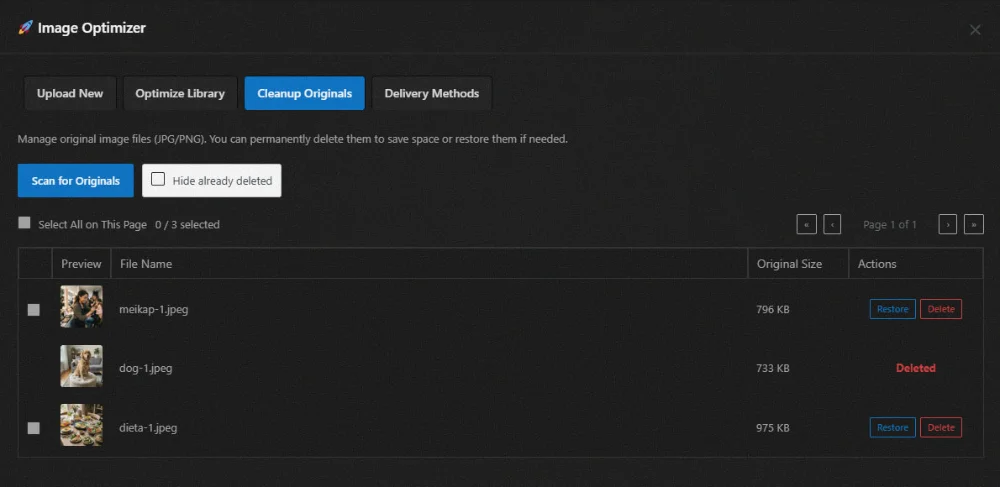
- Isolate Original Masters: Scans and builds a paginated view highlighting the file footprints of archived master files currently remaining on your server.
- Granular Restoration: A dedicated Restore function instantly rolls back files to their uncompressed states if any visual artifacts are detected.
- Permanent Disk Purging: A permanent Delete option removes original source files entirely from your hosting environment, instantly freeing up disk space.
4. Delivery Methods: Flexible Asset Serving
The final module, Delivery Methods, configures how optimized assets are dynamically served to visitors on the frontend:
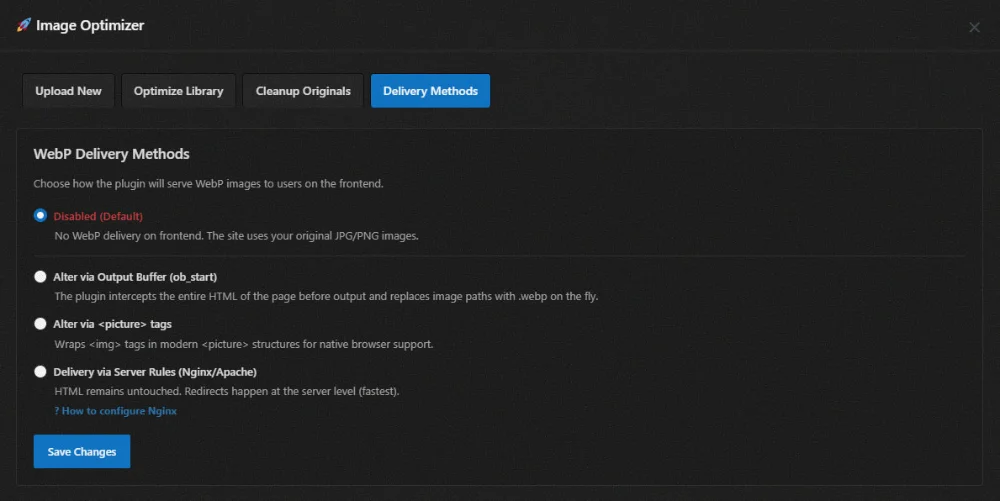
- Disabled (Default): Shuts off frontend delivery overrides, keeping original JPG/PNG links active.
- Output Buffer Interception (
ob_start): Dynamically parses the entire page’s compiled HTML payload right before delivery, substituting standard image paths with optimized WebP strings on the fly. - Modern HTML5 Picture Tags: Wraps standard image declarations inside semantic
<picture>wrappers, providing native multi-format browser fallbacks automatically. - Server-Level Directives (Nginx/Apache): The fastest approach. Leaves your HTML completely untouched and handles asset routing directly via low-level rewrite rules at the web server layer.
Conclusion
Image Optimizer stands out as a highly efficient, self-contained optimization utility. By moving heavy data compression tasks out of server PHP environments and into client-side WebAssembly, it solves common hosting performance limitations, eliminates recurring API costs, and keeps your data private. With its comprehensive toolset spanning pre-upload processing, retroactive media library scans, original backup cleaning, and versatile server-level delivery methods, it offers a complete, production-ready performance suite for modern WordPress development.